Showing posts with label After Effects. Show all posts

Wednesday, 29 April 2015

TITLE SEQUENCE: "Happy Graphic"


This is the latest after effects tutorial that I did, the aim of the tutorial was to create an animated title of any words of phrases that you wanted. Combining the skills I had already learnt in the last tutorials of the position and opacity tools and the 3D tools that we learnt in this tutorial. 

Step 1: First we spent some time deciding what we wanted our title page to look like, I decided to use the words "A HAPPY GRAPHIC" I felt that I could do a lot with this phrase and animate the words in different ways to make it more interesting. 

Step 2: Once we had decided what to use it was time to start making it! I used a bold font on Adobe Illustrator and used two different colours Red and black to make the "Happy" word stand out from the rest of the phrase. 

Step 3: Once I had created the phrase on Illustrator I imported the phrase into After effects and started using different effects like the position tool and the rotation tool to start to make the text move and animate. I also tried out some options called the 3D options which allowed me to make the text look 3 dimensional. Axis options, bevel and emboss and drop shadow options were just some of the effects that were in these options. 

This tutorial was very helpful because it introduced me to a completely new set of skills in after effects. I will be using the 3D options in future because they are a clever way of bringing an animation to life by creating an atmosphere for text and objects! 

Friday, 27 February 2015

KINETIC TYPE: "Personal experimentation"


After I created a small typographic animation I used these skills to start to create my own animation using a song I like, I used the skills I learnt using keyframes and transition to create this small animation, it isn't completely finished yet but I am happy with the transition and the effect from one to another.

Thursday, 19 February 2015

KINETIC TYPE: Final


This is the final design of my typography animation I created using a combination of Adobe Illustrator and Adobe after effects.

STEP 1:  I started by making three different designs on illustrator for the different sections of my text, I chose a background that I thought would work well with the meaning behind the quote and the font I was planning to use. I created the three different sections of my text by creating a new art-board by holding the alt key and duplicating the first rectangle to create two more along side it. 

STEP 2: I then decided on the text I was going to use, I tried to use a variation of different fonts that worked well together to keep my animation interesting and decided I would use a combination of AVENIR (ultralight), Century Gothic and AVENIR (Regular) I found that these fonts worked well together because the styles worked well in transition with each other. 

  I created the video using animated keyframes and the transform options to make the text move and appear from one place to another. I created transitions from one piece of the quote to the other by creating a new solid under the layer option so it seemed as if I created separate animations and blended them together. 

I also used the ease in and ease out tool which makes the text I was transforming shift from one place to another with a more finesse this made the keyframe transitions work better together because of how they blended seamlessly without any movement which would appear too sharp. 

Wednesday, 18 February 2015

KINETIC TYPE: "Illustrator setup"


These are the storyboards I created in Illustrator ready to be switched over to After effects

STEP1: I set the screen size to 1920 x 1080 ensuring that I was working in pixels.

STEP 2: I chose a background colour keeping in mind how I wanted the text to be presented and how the background colour would work well with my particular quote.

STEP 3: Once I had a background colour and I was happy I then imported my text into illustrator and began work on font and style, I split my quote up into 3 sections which made three 
separate storyboards.

STEP 4: I used AVENIR NEXT (Regular and ultralight) because of how adaptable it is to different styles and background, I found that even though it had a thin style the font still worked well with the quote because of it's delicate approach which wired well on any word. 
I used CENTURY GOTHIC (Italic and Regular) for the parts of my quotation that was more important, these words could then be out into bold to make the stand out more and become the most important words. 

STEP 5: Once I had all of my text I experimented with size and layout, trying different ways of fitting the quote together even in a block text or in a separate part of the art-board. I also added rectangles to the background which emphasised the most important words even more, I like this look because of how it uses a very bold style to convey a message. 

STEP 6: Now that I was happy with everything I then imported everything over to After effects and worked on the animation side of things.


Tuesday, 17 February 2015

KINETIC TYPE: "Style research"


This is a style I have found that I am very interested in pursuing in this new After effects project, I researched a channel called KINETIC typography on Vimeo and found a whole range of different inspirational typography piece that could be adapted to my quote. 

I found this Typography piece by Matthew Rogers on vimeo, the use of transition from one word to another is very appealing but I feel it could be widened to more of an animation styled piece. 

He uses very distinct movements of words to replicate the tone and sharpness of Stephen fry's voice, I believe this style could be widened by adding more punctuation in pauses to replicate how Stephen is talking. I also think that different font could be used with different transitions to expand on important words. This would work well with Robin williams quote because of the amount of pauses and different words he uses.

KINETIC TYPE: Research "My quote"


This is the quote clip I am going to use in my next After effects project, I find the quote to be beautiful but simplistic and complicated. The way Robin Williams words the quote taken from the DEAD POETS SOCIETY is very soft, I feel that the various pauses in the quote benefit me to fit more transitions and animation of the various text to make the quote blend together a lot better. 

Friday, 30 January 2015

CHARACTER ANIMATION: After effects


This is the animation I created in my After effects lesson, Firstly I created my object on Illustrator as a vector image because I felt that the quality was much better than Photoshop for creating this kind 
of thing. I ensured that every part of the object was saved onto a different layer this meant I could animate individual layers instead of just the phone itself. 

After I was happy with my illustration and the features I wanted to animate I imported the file into After effects making sure my work space was set at the correct width and height (1920x1080); After everything was set up and I was ready to animate I decided that the phone would look the best if it actually appeared to enter my scene. 

I created this effect by using the position tool and the parenting tool to assure that the screen layer would always follow the phone itself, I then used an array of different tools such as the Opacity, Rotation and position tool to create animation and motion for the different layers of my iPhone. 

After I went through the effects and animation process I added a texture to the background to give my animation another point of interest and more depth, I imported the image as a jPEG and put the textured background behind my background layer, I then used the Multiply tool on my background layer to make the layer more transparent which allowed the texture to show through and create a 
nice effect.

Overall I am very happy with how the animation has turned out, the animation is smooth and crisp and there are points of various speed between the keyframes which gives the animation a variation of speed and interest. 

Friday, 12 December 2014

MOVIE TRAILER: Final


This is the trailer I have created using the different photographs and the effect I downloaded free from cutestockfootage.com I have also used music I have downloaded to create the feel of a horror movie, this coupled with the crackling film effect and background noised from the audio adds to the effect of a horror film. 


Tuesday, 9 December 2014

MOVIE TRAILER: Edited photographs


These are some of the Photographs I have edited so far, I have used different effects and techniques to make the individual photographs pop more and become more relevant and in keeping of the horror theme for my trailer. 

I have used Levels and Curves to make the image contrast from dark to light I didn't use brightness and Contrast because of what I learned in the last tutorial that Brightness and Contrast tends to ruin the image slightly and you lose some of the textures and other important aspects of the image. 

I also used Hue and Saturation to make certain colours stand out, I used this on the Photograph of the tracks because I wanted the blue to be the dominant colour which emphasised the grain in the wood and individual textures of the image. 

Overall these edits have gone well, I have come out with strong Photographs which I can now take to After effects to begin to swap over the older images with my images, I can't wait to start adding affects and grain to my trailer and watch as my horror trailer comes to life!

MOVIE TRAILER: Initial photographs


Here is a small select few of some of the new Photographs I have taken, the reason I decided to take new photographs was because of the quality of the photographs I took before simply weren't good enough! I took these Photographs with a great camera the Nikon DSLR and the quality and depth of my photographs are much sharper and crisper and will ultimately look better on my trailer. 

I am very happy with the photographs I have taken of Huddersfield train station, I will now use Photoshop to edit some of the Photographs I have taken to make them darker and add effects to create a feel for this horror trailer I am wanting to create. 

Friday, 28 November 2014

TRAILOR PHOTOGRAPHS


Here are my Photographs for my horror film I am going to create in After Effects, I have taken a lot of the Photographs in a dark setting to enhance the appearance of the horror film I am going to make. 


Friday, 7 November 2014

Blog Setup


First we opened blogger on google and created an account with our GMAIL accounts. We then moved onto the layout and what our blogger would say. This includes the "Header" navigation bar and so on. We added gadgets which allowed us to add our Vimeo accounts and a small personal statement which we used to introduce our blog to people.


Once we had our layout complete we moved onto our templates, this is where we chose a design for the background of out blog. This didn't matter too much at this point because it was always re editable at a later date. The main focus was getting all of the correct information on the blog to begin with. 


Once we had our template chosen we could move onto more advanced settings. Here we could choose different fonts, colours and sizes for the features on the blog. I chose to create mine with more advanced setting and used different fonts and layouts and just kind of played around with everything in this section until I was happy. 


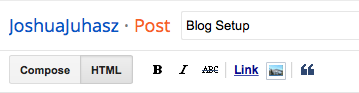
The next thing we learnt how to do was create a post, we did this by using these buttons in the "Create post" section of our blogs. We could title the post to whatever we wanted and used the labels bar to the right of this to directly link our posts to our blog. 

HTML BUTTON: This button is the button which holds all of the embedded coding, if we were posting something like a video we had downloaded we would first paste the embedded text onto this. After we had done this we would go onto the "COMPOSE" button and would find our video perfectly in tact. 


So that's it. My blog is set up and I feel that I am happy with the overall design and the fact that I have all of the labels that were ask of. Now I will start to post things on the blog as I go along with different tutorials throughout the year.