
Friday, 21 November 2014

New Idea - Fold out Illustration

This is one of my concepts, I had the idea of creating a fold out book to present my illustration on instead of just having the illustration on a flat piece of A3 paper.
The fold out book offers another dimension to my illustration which I find interesting, I also think that this would allow my designs to flow better throughout the fold out book when you unfold the book you will see the entire illustration spread across a foldout which demonstrates the vastness of the city and how I show that in my illustrations.
Thursday, 20 November 2014
Adobe Illustrator vector: Marilyn Monroe
Marilyn Monroe

Step 1- We imported an image of Marilyn Monroe into a new document in Adobe Illustrator,we created a layer called "Facial Outlines" on this layer we proceeded to use the Pen tool to create the face and hair, without any fills. We then filled the basic outline of the face and hair in with two colours and cleaned up the design making sure there were no gaps in-between the hair and face.


Step 2- After we had created the basic outline we created the neck on the same layer by drawing a box like shape with the Pen tool I then coloured the neck the same colour as the face so they blended seamlessly together. Then I created a new layer above the facial outlines for the shadow which I also made using the Pen tool. I fixed any gaps between the shadow and the other objects by using the direct selection tool to fix various anchor point.

Step 3 - I created a new layer to start on the facial features and named the layer "Features" I deselected the face and hair so I only the original image was visible I then traced around the eye contour to create this eye shape.

Step 4 - I then created the eyelashes by creating a single curve and increasing the stroke, I then added a pointed effect to the eyelash so it didn't have a flat edge and actually looked like an eye lash.
I created the bottom lashed by flipping the curve using Transform.
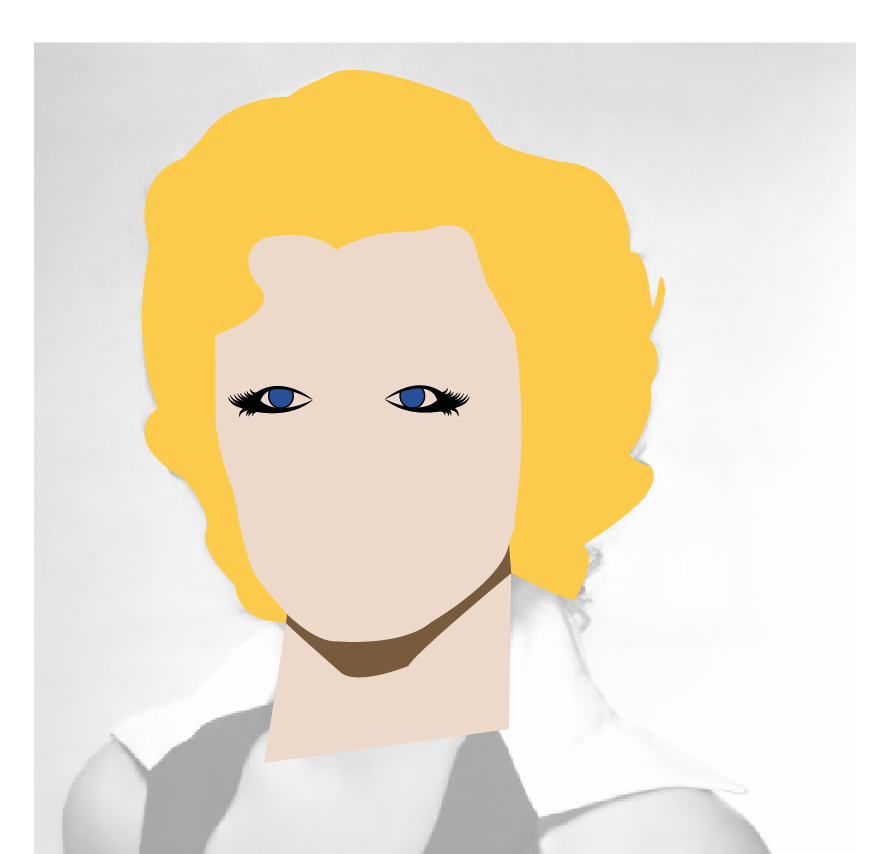
Step 4- I made a copy of the original eye and reflected it using transform, I adjusted the pupil so both eyes are looking in the right direction.

Step 5 - I made an outline of the white of the eye and sent it to the back of the contour, I then made pupils using the ellipse tool and highlights using the same tool.

Step 6 - I created the eyelashes using the Pen tool again increasing the stroke to 8 and then making the stroke cap a rounded edge to give the effect of an eyebrow.

Step 7 - I made the lines for the nose using the pen tool using suggestive lines to mark out where the nose might be.

Step8 - I made the lips using then pen tool adding a bright red for her lips and highlight were her lipstick is sparkling, this concluded my Marilyn Monroe illustration which I am overall very
happy with.
WORKSHOP WEEK_C4D PUTTING AN OBJECT INTO A FILM

This is what I created in a workshop in workshop week, using C4D and After effects we imported a simple object into an uploaded video which was taken in the Creative arts building of
Huddersfield university and began to work on the work space by creating a shape. Once we created the shape we then put it into the video using after effects.
Thor - Speed Painting (#Photoshop Element) | CreativeStation
This is an Illustration by "Creative Station" I found via Youtube.
He creates an incredible illustration of THOR using only the Pain brush tool in a time-lapse styled video! It took him 10 hours to complete the overall design and it was worth it in the end. The production process looks laborious but has worked well and the atmosphere and depth that has been created has worked well. He uses different colour techniques and strategies to create this illustration and gets it exactly right. What an amazing Illustration!
SWERVE- "So Rich" Illustration and design process
"So rich" by SWERVE.
I love this style of work he is doing at the moment, turning sketches and ideas digital and developing them on Adobe Illustrator. He uses the Pen tool for the majority of this design very well, he obviously has a great understanding of how Illustrator works.
A lot of his work is based around creating Logo's and branding for clients, this is well demonstrated in this piece of work as we see him create a SPEEDART LOGO for "So rich".
He also creates shadows and highlights using the Pen tool to make this design come to life!
Wednesday, 19 November 2014
Perth Theatre

This is my next illustration, the Perth Theatre is a very small and quirky part of Perth which has a lot of character and influence on the city. The theatre has recently been renovated and upgraded but still has it's original style which I find very interesting and smart.
This in itself shows a city In flux and is perfect to go onto my big illustration.
Subscribe to:
Posts (Atom)